Create EMR Cluster Stack
1. In this module, we will:
- Create new folder
- Create new python file
- Create new EMR cluster stack class
Inside the new class:
- Create a new policy to read from the scripts directory
- Create EMR Cluster
- Retrieve correct subnet ID from AWS console under EC2-VPC
- Create Hive step for creating the tables
- Create Hive step for transforming the data
# Create new folder
mkdir emr_cluster_stack
# Create new python file and code
code emr_cluster_stack/emr_cluster_stack.py
emr_cluster_stack.py
from aws_cdk import aws_ec2 as ec2, aws_iam as iam, App, Aws, Stack, aws_emr as emr
from constructs import Construct

MASTER_INSTANCE_TYPE = "m5.xlarge"
CORE_INSTANCE_TYPE = "m5.xlarge"
CORE_INSTANCE_COUNT = 2
MARKET = "ON_DEMAND"
CLUSTER_NAME = "emr-pipeline-cluster"
EMR_RELEASE="emr-6.10.0"
SUBNET_ID ="subnet-0b73564c58134f5ae"

class EMRClusterStack(Stack):
    def __init__(
        self,
        scope: Construct,
        id: str,
        s3_log_bucket: str,
        s3_script_bucket: str,
        vpc_name: str,
        **kwargs,
    ) -> None:
        super().__init__(scope, id, **kwargs)

        scripts_location = f"{s3_script_bucket}/emr_pipeline/scripts"

        # enable reading scripts from s3 bucket
        read_scripts_policy = iam.PolicyStatement(
            effect=iam.Effect.ALLOW,
            actions=["s3:GetObject",],
            resources=[f"arn:aws:s3:::{scripts_location}/*"],
        )
        read_scripts_document = iam.PolicyDocument()
        read_scripts_document.add_statements(read_scripts_policy)

        # emr service role
        emr_service_role = iam.Role(
            self,
            "emr_service_role",
            assumed_by=iam.ServicePrincipal("elasticmapreduce.amazonaws.com"),
            managed_policies=[
                iam.ManagedPolicy.from_aws_managed_policy_name(
                    "service-role/AmazonElasticMapReduceRole"
                )
            ],
            inline_policies={
                "read_scripts_document": read_scripts_document
            },
        )

        # emr job flow role
        emr_job_flow_role = iam.Role(
            self,
            "emr_job_flow_role",
            assumed_by=iam.ServicePrincipal("ec2.amazonaws.com"),
            managed_policies=[
                iam.ManagedPolicy.from_aws_managed_policy_name(
                    "service-role/AmazonElasticMapReduceforEC2Role"
                )
            ],
        )
        # emr job flow profile
        emr_job_flow_profile = iam.CfnInstanceProfile(
            self,
            "emr_job_flow_profile",
            roles=["EMR_EC2_DefaultRole"],
            instance_profile_name="emrJobFlowProfile_",
        )

        # create emr cluster
        emr_cluster = emr.CfnCluster(
            self,
            "emr_cluster",
            instances=emr.CfnCluster.JobFlowInstancesConfigProperty(
                core_instance_group=emr.CfnCluster.InstanceGroupConfigProperty(
                    instance_count=CORE_INSTANCE_COUNT,
                    instance_type=CORE_INSTANCE_TYPE,
                    market=MARKET
                ),
                ec2_subnet_id=SUBNET_ID,
                ec2_key_name="ProjectProAlexClark",             #Change this
                keep_job_flow_alive_when_no_steps=True,
                master_instance_group=emr.CfnCluster.InstanceGroupConfigProperty(
                    instance_count=1,
                    instance_type=MASTER_INSTANCE_TYPE,
                    market=MARKET
                ),
            ),
            steps=[
                {
                    "actionOnFailure": "CANCEL_AND_WAIT",
                    "hadoopJarStep": {
                        "jar": "command-runner.jar",
                        "args": [
                            "hive",
                            "-f",
                            f"s3://{scripts_location}/create_tables.hql",
                        ],
                    },
                    "name": "create_tables",
                },
                {
                    "actionOnFailure": "CANCEL_AND_WAIT",
                    "hadoopJarStep": {
                        "jar": "command-runner.jar",
                        "args": [
                            "hive",
                            "-f",
                            f"s3://{scripts_location}/transform_data.hql",
                        ],
                    },
                    "name": "transform_data",
                }
            ],
            job_flow_role="EMR_EC2_DefaultRole",
            name=CLUSTER_NAME,
            applications=[emr.CfnCluster.ApplicationProperty(name="Hive")],
            service_role=emr_service_role.role_name,
            configurations=[],
            log_uri=f"s3://{s3_log_bucket}/{Aws.REGION}/elasticmapreduce/",
            release_label=EMR_RELEASE,
            visible_to_all_users=False,
        )
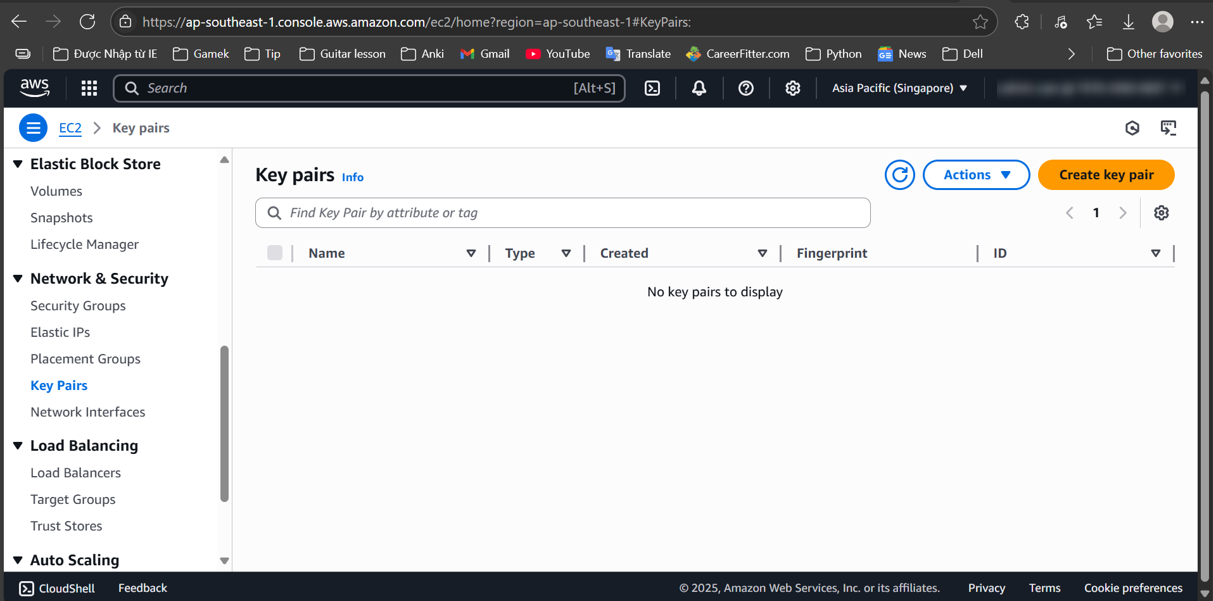
You’ll have to change ec2_key_name
Get ec2_key_name at (Here)
This Python code uses the AWS Cloud Development Kit (CDK) to define an Amazon EMR (Elastic MapReduce) cluster. Below is an explanation of its components and functionality: Overview The code creates an EMR cluster stack with specific configurations for instance types, IAM roles, and settings for running Hive scripts.
Key Components
1. Constants:
- Instance Types: Defines the types of instances used for the master and core nodes (m5.xlarge).
- Core Instance Count: Sets the number of core instances to 2.
- Market Type: Specifies that the instances will be on-demand.
- Cluster Name and EMR Release: Sets the name of the cluster and the version of EMR to use.
- Subnet ID: Specifies the subnet in which the EMR cluster will run.
2. EMRClusterStack Class:
- This class inherits from Stack and encapsulates the infrastructure for the EMR cluster.
3. S3 Script Location:
- Constructs the S3 location where the EMR scripts are stored.
4. IAM Policies:
- Read Scripts Policy: Allows the EMR cluster to read scripts from the specified S3 bucket.
- EMR Service Role: Defines a role for EMR to assume, which has managed policies for EMR service access along with the inline policy to access the S3 scripts.
- EMR Job Flow Role: Creates a role for EC2 instances in the EMR cluster, allowing them to perform necessary operations.
5. EMR Cluster Configuration:
- Job Flow Instances Configuration: Specifies the instance configuration for the EMR cluster, including the master and core instance groups.
- Master and Core Instances: The master instance is configured to have 1 node, while the core instances are set to 2 nodes.
- Key Pair: Uses a specified EC2 key pair for SSH access.
- Job Flow Role: Uses the default EMR EC2 role for job execution.
6. Steps to Execute:
The cluster will run two steps:
- Create Tables: Executes a Hive script to create tables in the data warehouse.
- Transform Data: Executes another Hive script to transform data.
7. Cluster Properties:
- Applications: Specifies that the cluster will run Hive.
- Service Role: Associates the EMR service role created earlier.
- Logging: Configures S3 logging for the EMR cluster.
- Visibility: Sets the cluster to not be visible to all users.
Summary
This code sets up an EMR cluster in AWS using CDK, configuring necessary IAM roles, instance types, and job steps for data processing. The cluster is designed to run Hive scripts stored in an S3 bucket, enabling data transformation and analysis.